In 2026, digital products have become one of the smartest, most beginner-friendly ways to earn money online. No warehouse. No shipping headaches. No inventory to manage. You create something once, put it up for sale, and it can keep earning for you while you sleep, travel, or scroll through your phone.
The best part? You don’t need to be a designer, a tech genius, or even have a big audience to get started.
In this post, I’m going to walk you through 7 of the most profitable digital products you can sell right now with real talk on what each one is, who buys it, and how to get started even if you’ve never done this before.
Let’s get into it.
What Even Is a Digital Product?
A digital product is anything someone can buy and download or access online. There’s nothing physical about it. No box. No shipping. No restocking.
Think of things like:
- A budget planner you download as a PDF
- An e-book you read on your phone
- A Canva template someone edits with their own brand colors
- A guide that teaches you how to meal prep for the week
These things are made once and sold over and over again. That’s what makes them so interesting, your income isn’t limited by your time or your energy. One product can sell to 10 people or 10,000 people without you doing anything extra.
Why Digital Products Are One of the Best Businesses in 2026
Here’s the simple math that makes digital products so attractive:
- No cost to duplicate. Once you’ve made the product, creating another “copy” for a new buyer costs you exactly $0.
- High profit margins. When someone buys your $27 printable planner, you keep most of that. No manufacturing fees, no supplier, no middleman.
- Global reach. Someone in Canada, Australia, or the UK can buy your product at 2am without you being awake.
- Passive income potential. After the initial work of creating and listing your product, sales can come in on autopilot, especially once you build an audience or get found on search platforms.
The e-learning market alone is worth over $200 billion globally, and creators on platforms like Gumroad and Etsy are regularly building five and six-figure incomes from digital products. The opportunity is very real and it’s only growing.
Based on my personal experience, i’ve made over $10k selling digital products online.
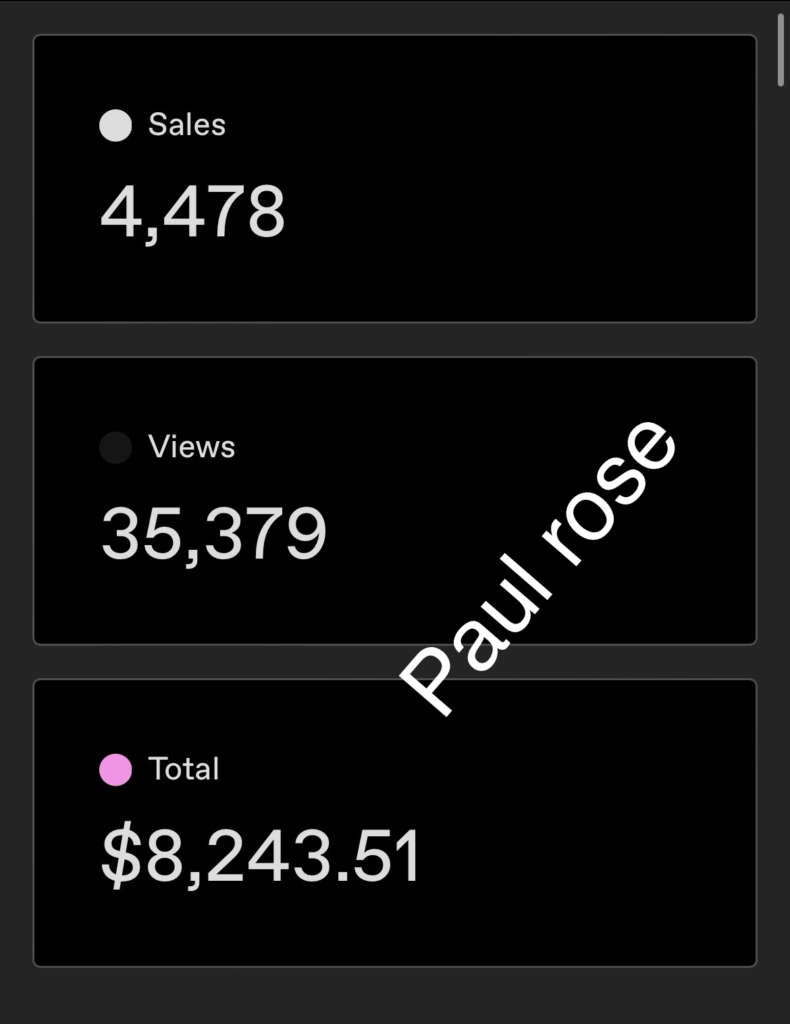
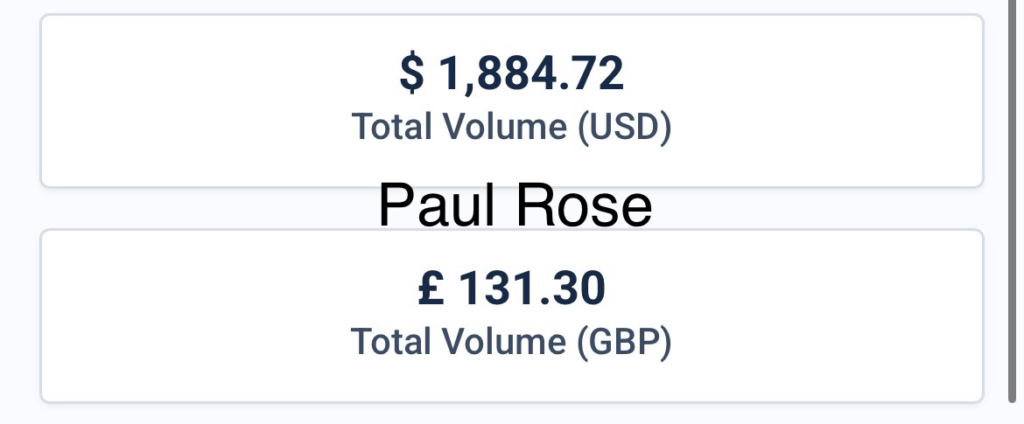
Now let’s talk about these profitable digital products themselves.
1. Printables: The #1 Beginner-Friendly Product
Best for: Complete beginners who want quick results
Printables are simple PDF files people download and print at home (or use digitally on their tablet). Think: daily planners, habit trackers, gratitude journals, budget sheets, meal planners, and to-do lists.
They’re incredibly popular because they solve real, everyday problems. People want to get organised. They want to manage their money better. They want to track their goals. A well-designed printable gives them a tool to do exactly that — and they’re happy to pay a few dollars for it.
Who buys them? Parents, students, teachers, small business owners, fitness lovers, and anyone trying to get their life together (so basically everyone).
Where to sell them: Etsy is the biggest marketplace for printables. You can also sell them on Gumroad, Payhip, or your own website.
How much can you charge? Anywhere from $3 to $25 per printable, or bundle several together and charge $15–$45 for a pack.
The exciting new thing you need to know: You no longer need Canva, design skills, or expensive software to create beautiful, professional printables. Claude (Anthropic’s AI) can now generate ready-to-download digital products as PDFs directly. You simply describe what you want — a weekly meal planner, a morning routine tracker, a budget worksheet — and Claude builds it and delivers it as a polished, downloadable PDF. No design tools. No templates. No learning curve. This is good news for beginners who’ve always wanted to sell printables but felt held back by the design side of things.
2. E-Books: Package Your Knowledge Into a Product That Sells
Best for: People who have a skill, story, or expertise to share
An e-book is a digital book — it can be 10 pages or 100 pages, and it can cover almost any topic you can imagine. The key is that it teaches something useful or solves a specific problem for a specific type of person.
You don’t have to be a professional writer. You don’t need a publishing deal. You just need to know something that other people want to learn.
Some e-book ideas that sell well right now:
- “How I paid off my debt in 18 months” (personal finance)
- “A beginner’s guide to natural hair care for Type 4 hair”
- “30 high-protein meals under $10”
- “How to start freelancing with no experience”
- “The stay-at-home mom’s guide to earning online”
See how specific those are? That’s the secret. The more clearly your e-book speaks to one person’s exact problem, the more it will sell. Broad topics get ignored. Specific solutions get bought.
Where to sell: Gumroad, Payhip, Amazon Kindle (for wider reach), or your own website.
How much can you charge? $7 to $97, depending on how much value it delivers and how detailed it is. Many creators start at $17–$27.
Quick tip: Keep your first e-book short and focused. A 20-page guide that solves one specific problem is worth more to your buyer than a 100-page ramble that covers everything loosely.
3. Templates
Best for: Anyone with some design or organisational skills
Templates save people time. That’s why they sell so well. Nobody wants to build a content calendar from scratch, design their Instagram feed layout, or format a professional invoice from a blank page — they just want a ready-made file they can drop their own information into.
Templates you can create and sell include:
- Social media post templates (Instagram, Pinterest, LinkedIn)
- Email newsletter templates
- Budget spreadsheet templates
- Resume and cover letter templates
- Business plan templates
- Content calendar templates
- Wedding planning templates
Who buys them? Small business owners, freelancers, virtual assistants, content creators, job seekers — basically anyone trying to work smarter.
Where to sell: Etsy is great for visual templates. Creative Market is ideal for design assets. Gumroad works well for spreadsheet and document templates.
How much can you charge? $7 to $45 per template, or bundle multiple templates together for $25–$75.
Important: You can also use Claude to help you generate template copy, outlines, and even structure — making the creation process much faster, especially for document and planning templates that don’t require heavy visual design.
4. Digital Planners
Best for: People who want to charge more for a premium product
Digital planners are interactive planner files designed to be used on tablets (especially iPads with apps like Notability or GoodNotes). They look like a beautiful journal or planner, but they’re fully digital — users write on them with a stylus, click between pages with hyperlinks, and organise their entire life in one device.
Digital planners have exploded in popularity, especially with students, productivity-obsessed professionals, and anyone who loves the aesthetic of a good planner but doesn’t want the paper waste.
Popular digital planner niches:
- Student planners (class schedules, assignment trackers, exam prep)
- Business planners (client management, revenue tracking, goal setting)
- Wellness planners (mental health check-ins, workout logs, sleep tracking)
- Moms’ planners (family meal planning, kids’ activity scheduling)
Where to sell: Etsy is the biggest market for digital planners. Many creators also build an audience on Pinterest and TikTok to drive sales.
How much can you charge? $12 to $55 per planner. Premium, well-designed planners with lots of pages regularly sell for $30–$45 on Etsy.
5. Online Courses and Mini Courses — High Ticket, High Impact
Best for: People who are ready to share their expertise at a deeper level
Online courses are one of the highest-earning types of digital products because they deliver the most value. Instead of a one-page guide, you’re giving someone a full learning experience — videos, worksheets, lessons, and a clear path from where they are now to where they want to be.
The good news? You don’t need a massive following or a fancy studio. You can start with a simple “mini course” — even just 4–6 short video lessons recorded on your phone — and sell it for $37 to $97.
Course topics that are selling well in 2026:
- How to use AI tools to grow your business
- Freelancing and remote work skills
- Social media growth for small businesses
- Natural skincare and DIY beauty
- Personal finance for beginners
- How to start selling digital products (meta, but it works!)
Where to sell: Teachable and Thinkific are beginner-friendly platforms. Gumroad also allows you to host simple courses. Whop is growing fast for creator courses.
How much can you charge? Mini courses: $27–$97. Full courses: $97–$497. Coaching programs: $500+.
Don’t let perfectionism stop you. Your first course doesn’t need to be a Hollywood production. Clear audio, good lighting, and genuinely helpful content will always win over perfect production value with nothing useful to say.
6. AI Prompt Packs — The Hottest New Category
Best for: People who use AI tools and want to help others do the same
This is one of the newest — and fastest-growing — categories of digital products. AI prompt packs are curated collections of prompts (instructions) that tell AI tools like Claude, ChatGPT, or Midjourney exactly what to do.
A lot of people know AI tools exist but have no idea how to get useful results from them. They type basic questions and get basic answers. A well-crafted prompt pack fixes that problem. It’s like giving someone a cheat sheet for getting the most out of AI.
Prompt pack ideas that are selling well:
- “100 prompts for content creators” (Instagram captions, blog ideas, email subjects)
- “ChatGPT prompts for small business owners”
- “Midjourney prompts for digital product covers”
- “AI prompts for teachers and educators”
- “Claude prompts for writing your first e-book”
Where to sell: Gumroad, Etsy, Payhip, and even your own website.
How much can you charge? $7 to $37 per pack. Large, niche-specific packs with 100+ prompts can sell for $27–$50.
Why this is so powerful: You’re already spending time figuring out the best ways to use AI tools. Packaging that knowledge and selling it is a natural next step — and people are actively searching for these products right now.
7. Swipe Files and Resource Kits
Best for: People who’ve built a process, system, or collection of resources
A swipe file or resource kit is a collection of ready-to-use materials that shortcut someone else’s work. In marketing, “swipe files” are collections of proven email subject lines, ad copy, or social media captions that someone can adapt for their own use. Resource kits are bundles of tools, checklists, links, and guides on a specific topic.
For example:
- A “New Blogger Swipe File” with 50 blog post title formulas, 30 email subject lines, and a content plan template
- A “Small Business Launch Kit” with a business checklist, financial tracker, client contract template, and welcome email scripts
- A “Healthy Eating Resource Pack” with meal prep guides, grocery list templates, and recipe planning sheets
Who buys them? Entrepreneurs, bloggers, freelancers, students, coaches — anyone who values their time and wants to skip the grunt work.
Where to sell: Gumroad is perfect for this. Etsy also works well for kits aimed at creative or home-based niches.
How much can you charge? $15 to $67, depending on how comprehensive the kit is. Bundles tend to sell well because buyers feel like they’re getting great value.
🎁 FREE RESOURCE: Claude Printable Ideas — Your Shortcut to Starting Today
Not sure what kind of printable to create first? I put together a free list called “Claude Printable Ideas” — it’s a collection of ready-to-use printable concepts across popular niches like wellness, finance, family, productivity, and business.
The list includes:
- The exact product idea (what it is and who it’s for)
- A suggested title and description
- A prompt you can take straight to Claude to generate the product as a downloadable PDF
This is completely free and it’s designed to help you go from “I don’t know where to start” to “I have my first product ready” in a single afternoon.
👉 Click here to grab your free Claude Printable Ideas list
For a long time, the biggest obstacle for beginners wasn’t the ideas — it was the design. You’d have a great concept for a planner or a workbook, but then you’d spend hours wrestling with Canva, trying to get things to line up, fixing fonts, and wondering if it looked professional enough to sell.
That’s no longer the barrier it used to be.
Claude can now generate ready-to-download digital products as polished PDFs directly. You describe what you want, and Claude builds it for you. A weekly meal planner with a shopping list section. A 30-day gratitude journal with daily prompts. A business launch checklist with 50 action items. A morning routine tracker. Whatever you need.
No Canva account required. No design skills. No back-and-forth with a freelancer.
The output is a clean, professional PDF file that you can sell exactly as-is or use as the foundation for a more customised version.
This matters because it removes the single biggest excuse most beginners have for not starting. If the “I’m not a designer” wall has been holding you back, it no longer has to.
How to Actually Start Selling Digital Products (The Simple Version)
Here’s the no-fluff version of how to go from zero to your first sale:
Step 1: Pick one product idea. Don’t try to do everything at once. Choose one product from this list that feels most natural to you. What do you know how to do? What problems have you personally solved?
Step 2: Create the product. Use Claude to generate a PDF printable, write your e-book in Google Docs, build your template in Canva or Excel, or record your mini course on your phone. Done is better than perfect.
Step 3: Set up a simple shop. Gumroad is the easiest place to start — you can have a product listed in under 30 minutes. Etsy is great if you want marketplace traffic. Payhip is another solid free option.
Step 4: Price it. Don’t undervalue your work. A $7 printable isn’t significantly more attractive than a $15 one, but $15 shows more confidence and brings in more income. Price based on the value it delivers.
Step 5: Tell people about it. Post about it on Instagram, Pinterest, TikTok, or wherever your people hang out. Don’t just post once — talk about it regularly, show the product, explain who it’s for, and share what problem it solves.
Step 6: Learn and improve. Your first product probably won’t be your best seller. That’s completely normal. Every product teaches you something about what your audience wants. Keep making and keep refining.
Final Thoughts
Digital products aren’t a magic shortcut to overnight riches. But they are one of the most accessible, low-risk, high-reward income streams available to everyday people in 2026.
You don’t need a degree. You don’t need a warehouse or a team. You don’t need thousands of followers to make your first sale.
You just need one good idea, the willingness to create something useful, and the confidence to put it out there.
And with tools like Claude handling the heavy lifting on design and content creation, the barrier to getting started has never been lower.
Pick one product from this list. Create it this week. List it. Tell people about it.
That’s how it starts.
Did you find this helpful? Save it, share it with a friend who’s been wanting to start selling digital products, and don’t forget to grab the free Claude Printable Ideas list above.