Now before you roll your eyes and say ‘stickers aren’t for adults,’ hear me out. These aren’t the paper stickers you stuck on your homework in third grade. Digital stickers are virtual graphics that people use in apps like GoodNotes, Notability, Notion, and Instagram Stories. They are downloaded instantly, they never run out of stock, and they can be sold to thousands of people using the exact same file you created once.
Make them once. Sell forever. Just you, your laptop, and a whole lot of opportunity.
In this guide, I’m going to walk you through exactly how to build a six-figure digital sticker business from absolute scratch, even if you have zero design experience, zero budget, and zero clue where to start. By the end of this post, you’ll have a step-by-step plan you can start executing today.
Why Digital Stickers? Why Now?
Before we dive into the how, let’s talk about the why. Because if you’re going to spend time building something, you deserve to know it’s actually worth your time.
The digital planning market has absolutely exploded in recent years. Millions of people now use iPad apps to organize their lives, plan their weeks, track their habits, and decorate their journals, just like they would with a physical planner, except everything is digital. And guess what they want to make those digital planners look beautiful? You guessed it. Stickers.
Here’s what makes this business model so attractive for beginners:
- Nearly 100% profit margins. Once you’ve made the file, it costs almost nothing to sell it again and again.
- Zero upfront capital required. You can start with free tools and free platforms.
- No shipping, no inventory, no headaches. The product delivers itself automatically.
- Massive and growing audience. Digital planners are not a fad — they’re a lifestyle for millions of people worldwide.
- You don’t need to be an artist. With today’s AI tools and beginner-friendly software, anyone can create beautiful stickers.
The joke in the digital product world is that selling digital stickers is basically legal money printing. You design it once, list it, and then go live your life while your Etsy notifications go off in the background.
Phase 1: Finding Your Niche (Don’t Skip This — It’s the Foundation)
Here’s a painful truth that nobody in the ‘make money online’ space wants to admit: most people who fail at selling digital products don’t fail because of bad design. They fail because they chose the wrong niche.
If you open Etsy right now and search ‘digital stickers,’ you’ll find hundreds of thousands of results. Generic flower stickers. Generic motivational quotes. Generic animals. All competing for the same eyeballs. That’s a tough place to stand out, especially when you’re just starting.
The solution is to go specific. Really specific. The riches are in the niches — and yes, I know that rhyme is cliché, but it’s cliché because it’s true.
The Cross-Idea Formula: Your Secret Weapon
The Cross-Idea Formula is one of the most effective strategies for finding a winning sticker niche. Here’s how it works: you take two separate popular interests and combine them into one super-specific product idea.
Think of it like a Venn diagram. In one circle, you have a broad category like ‘fitness.’ In the other circle, you have a specific audience — like ‘medical students.’ In the middle, where they overlap, you have a niche: ‘fitness and wellness stickers for medical students who need to balance their crazy schedule and actually remember to drink water.’
That’s way more interesting than just ‘fitness stickers,’ and it immediately speaks to a very specific group of people who will feel like the product was made just for them.
More examples of the Cross-Idea Formula in action:
- Minimalist design + Teacher productivity = Clean, modern lesson planning stickers for teachers
- Mental health awareness + Student life = Self-care and affirmation stickers for college students
- Small business branding + Feminine aesthetic = Pastel Instagram Story stickers for female entrepreneurs
- Anime art style + Productivity planning = Anime-inspired habit tracker stickers for digital planners
High-Demand Categories Exploding in 2026
Not all sticker niches are created equal. Some are red-hot right now. Here are the categories that are showing the most growth in the digital download market this year:
1. Digital Planner Assets
Apps like GoodNotes and Notability have millions of active users who are constantly looking for stickers to decorate their planners. They want functional stickers (icons for water intake, workout logs, mood trackers) and decorative ones (seasonal themes, inspirational quotes). This category is enormous and still growing.
2. Teacher and Student Packs
Teachers are some of the most enthusiastic buyers of digital planners and stickers. They need stickers for grading, lesson planning, classroom management, and back-to-school setups. Students need them for academic goal tracking, exam schedules, and study session planning. This is a loyal, repeat-buying audience.
3. Small Business Branding
Small business owners and solopreneurs use digital stickers in their Instagram Stories, digital thank-you notes, Canva designs, and email newsletters. They want aesthetic, professional-looking elements that match their brand colors and personality. These buyers also tend to have more money to spend than individual consumers.
4. Positive Affirmations and Mental Health
Stickers featuring mental health reminders, self-love quotes, and motivational slogans are trending hard across social media. The audience for this category is massive, crosses all demographics, and people share these stickers constantly — which means free marketing for you.
How to Validate Your Niche Before You Design a Single Thing
Here’s a mistake I see beginners make all the time: they spend three weeks designing a beautiful sticker pack, list it on Etsy, and then wonder why nobody is buying. The reason is almost always that they skipped validation. They made what they liked, not what the market was already searching for.
Before you design anything, do this:
- Go to Etsy and search your niche idea. Look at what’s already selling. If you see listings with hundreds or thousands of reviews, that’s a good sign — it means there’s real demand. Don’t run away from competition; run toward it.
- Use a tool called Alura (there’s a free version). It shows you the real search volume and sales data for Etsy keywords so you can see exactly what people are buying.
- Look for ‘commercial intent’ keywords. These are phrases that show someone is ready to buy right now. ‘Aesthetic digital planner stickers for nursing students’ has commercial intent. ‘What are digital stickers’ does not.
- Use ChatGPT or Claude to brainstorm keyword variations. Ask it: ‘What are 30 ways someone might search for digital planner stickers on Etsy for nursing students?’ You’ll get a lot of ideas in seconds.
The Design Toolkit
I have great news for you: you don’t need to know how to draw. You don’t need Photoshop. You don’t need a graphic design degree. In 2026, the tools available to beginners are so powerful that the barrier to making beautiful, professional-looking stickers is practically zero.
Let’s break down the main tools you’ll use.
Tool #1: Canva
If you’re a beginner, Canva is where you should start. It’s free to use (with an optional Pro upgrade that’s well worth the small monthly cost), it runs in your browser, and it’s so easy to use that your grandmother could probably figure it out.
Here’s what makes Canva particularly great for sticker making:
- Background Remover: Canva Pro includes a one-click background remover tool. This is absolutely essential for sticker making because your stickers need transparent backgrounds (more on that in Phase 3).
- AI Image Generation: Canva has built-in AI tools that can generate unique illustrations based on text prompts. You can type ‘cute watercolor cat sitting on a book’ and it will generate several options for you to customize.
- Sticker Effects: You can add white borders, drop shadows, and glow effects directly in Canva — all the things that make a graphic look like a real sticker.
- Massive Template Library: Thousands of design templates, elements, and fonts to work from so you’re never starting with a blank screen.
Pro tip: When using Canva for stickers, work on a canvas that’s at least 1000 x 1000 pixels. This gives you enough resolution for your stickers to look sharp on tablet screens. If you’re selling in bulk packs, create a template and use it as your starting point for each new sticker so your pack has a consistent look.
Tool #2: Kittl
Kittl is Canva’s cooler older sibling. While Canva is fantastic for general design, Kittl is specifically built for creators who want that polished, hand-crafted aesthetic without actually hand-crafting anything.
Kittl shines in a few specific ways:
- Advanced Typography: If you want your stickers to feature beautiful text — like vintage labels, retro fonts, or hand-lettered styles — Kittl’s typography tools are far superior to Canva’s.
- Professional Templates: Kittl’s templates are specifically designed for merchandise and commercial products, which means they look more professional and distinctive than generic social media templates.
- Vintage and Retro Style: If your niche leans toward vintage aesthetics, cottage-core vibes, or retro designs, Kittl makes it incredibly easy to achieve that look.
Tool #3: Adobe Illustrator
Adobe Illustrator is the industry-standard tool for creating vector graphics. Unlike regular image files (which get blurry when you make them bigger), vector files can be scaled to any size from a tiny sticker on a phone screen to a massive billboard without losing any quality.
I won’t sugarcoat it: Illustrator has a steeper learning curve than Canva. But here’s why it might be worth learning later in your journey:
- Your digital sticker designs can also be used for physical print-on-demand products (stickers, mugs, t-shirts, tote bags), which opens up an entirely new revenue stream.
- Vector stickers have cleaner, crisper edges — which looks more professional and premium.
- If you ever want to license your designs or work with brands, vector files are the industry standard.
For now, as a beginner, stick with Canva or Kittl. You can always upgrade your toolkit later as your business grows.
Tool #4: AI Content Generation
Here’s one of the biggest advantages that digital sticker creators in 2026 have that creators from just a few years ago didn’t: AI tools that can help you generate ideas, write copy, and even create artwork in seconds.
How to use AI in your sticker business:
- For text ideas, ask ChatGPT or Claude: ‘Give me 50 funny and motivational slogans for a digital sticker pack aimed at female entrepreneurs who are tired of toxic hustle culture.’ You’ll have 50 usable ideas in under 30 seconds.
- For image ideas
- , use Canva’s AI generator, Adobe Firefly, or Midjourney to generate base illustrations that you then customize and stylize.
- For listing copy and SEO, use AI to write your Etsy product titles, descriptions, and tag suggestions.
- For content marketing, use AI to generate Pinterest pin descriptions, TikTok video scripts, and Instagram caption ideas.
Making Your First Digital Sticker Pack — Step by Step
Alright, you’ve picked your niche, you’ve got your tools ready, and you’re excited to start creating. Let’s walk through the exact process of making a professional-quality digital sticker pack.
Step 1: Plan Your Pack (The Step Most People Skip)
Before you open Canva and start designing, spend 20 minutes planning your pack. This will save you hours of confusion and redesigning later.
Decide on these things before you start:
- How many stickers will be in the pack? A good starting point is 20 to 30 stickers for a paid pack. For a free lead magnet (more on that later), 5 to 10 is enough.
- What’s the color palette? Choose 3 to 5 colors that work together and stick to them across all the stickers in your pack. This makes the pack look cohesive and professional.
- What’s the art style? Will it be flat and minimal? Watercolor and soft? Bold and graphic? Cute and kawaii? Pick a style and be consistent.
- What types of stickers will the pack include? For a planner-focused pack, this might be a mix of functional icons (checkboxes, arrows, banners) and decorative elements (illustrations, quotes, dividers).
Step 2: Create the Base Graphics
Now open your chosen design tool and start building your stickers. Here are some important things to keep in mind:
- Work on a transparent canvas. In Canva, you can enable a transparent background in the File settings. This ensures your stickers have a transparent background from the start.
- Keep the canvas at least 1000 x 1000 pixels per sticker. For maximum quality, 2000 x 2000 pixels is even better.
- If you’re using AI-generated art, run the same or similar prompt multiple times until you have a set of images with a consistent style.
- Don’t overthink it. Your first pack won’t be perfect, and that’s completely okay. Done and listed is infinitely better than perfect and unpublished.
Step 3: Add the ‘Sticker Look’
A graphic doesn’t automatically look like a sticker. To give it that real sticker feel, you need to add two things: a thick white border and a subtle drop shadow. This makes the sticker look like it’s popped off the page and ready to be placed somewhere.
How to do this in Canva:
- Select your graphic element.
- Click on ‘Edit image’ in the toolbar, then go to ‘Shadows.’
- Select the ‘Glow’ effect.
- Set the glow color to white and increase the size until you have a thick, visible white border around the graphic.
- Add a regular (non-white) drop shadow underneath for depth.
If you’re using Illustrator, you’ll use the ‘Offset Path’ tool to create a perfectly clean white outline around your design. This gives a slightly more professional result, but Canva’s glow method works very well for most purposes.
Step 4: Export Correctly
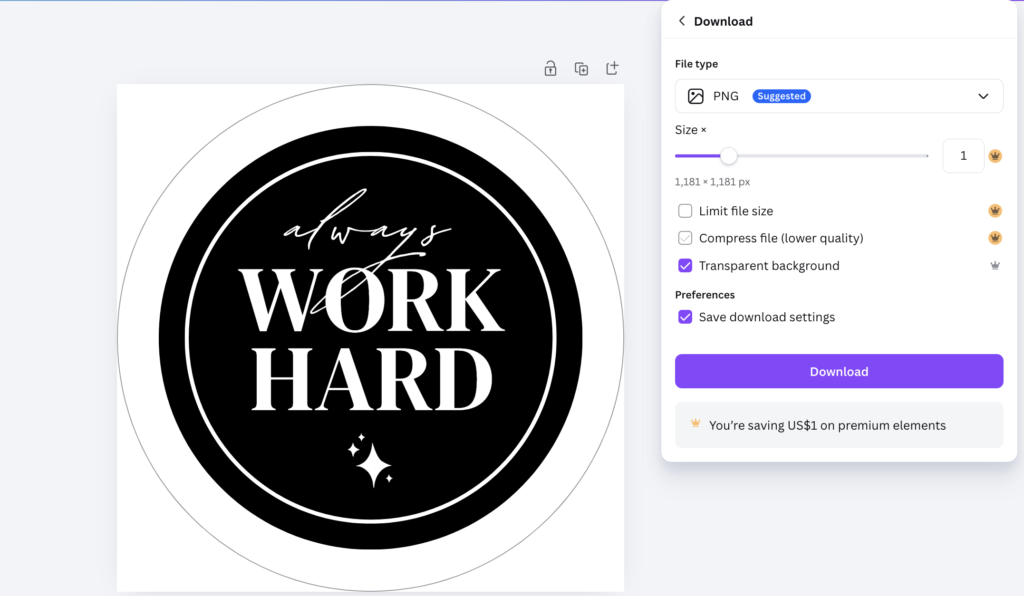
This is the most important technical step, and it’s also where a lot of beginners mess up. Your stickers must be exported as PNG files with transparent backgrounds. Not JPEG. Not PDF. PNG with transparency.
Here’s why this matters: when someone downloads your sticker and places it over their digital planner page, a JPEG would show an ugly white box around the image. A PNG with transparency allows the sticker to float perfectly on top of whatever background they place it on, just like a real physical sticker.
How to export from Canva:
- Click ‘Share’ in the top right corner.
- Click ‘Download.’
- Choose ‘PNG’ as the file type.
- Check the box that says ‘Transparent background.’ This box only appears if you have Canva Pro. If you don’t have Pro yet, this is the #1 reason to get it.
- Click Download. That’s it.
Quality check before you export: zoom in to 200% and look at your sticker. Are the edges clean? Does the text look sharp? Are the colors consistent with the rest of your pack? If yes, you’re good to go.
Step 5: Create a GoodNotes-Ready File (The Bonus That Buyers Love)
Here’s a pro move that will separete you from other sellers: make a pre-cropped GoodNotes file where your stickers are already laid out on a sheet, ready to use. This is a huge value-add because many buyers don’t want to deal with importing and organizing individual PNG files.
To do this, open a new Canva canvas set to US Letter size (8.5 x 11 inches), arrange your stickers in a neat grid on the white canvas, and export it as a PDF. When buyers import this PDF into GoodNotes, the stickers are ready to go — they just have to cut them out with the lasso tool. This takes you about 10 extra minutes but can justify charging 50% more for your pack.
Setting Up Your Storefront (Where You’ll Actually Make Money)
You’ve got your stickers. They’re beautiful. They’re professional. Now you need somewhere to sell them. Let’s look at your three main options.
Option 1: Etsy — The Best Place to Start as a Beginner
Etsy is the undisputed king of digital downloads for beginners, and it’s where I recommend starting your business. The reason is simple: Etsy already has the customers. Millions of people open Etsy every day specifically searching for digital products. You don’t have to spend months building an audience or learning how to run ads. The platform hands you a ready-made marketplace.
The pros of Etsy:
- Built-in traffic: You can make sales without running a single ad, especially once your listings are optimized.
- Automatic delivery: When someone buys your product, Etsy sends them the download link automatically. You don’t have to do anything.
- Trust and credibility: Buyers trust Etsy. A new store on an unfamiliar website has to earn trust. An Etsy store benefits from the platform’s established reputation.
The cons of Etsy:
- Fees: Etsy charges a $0.20 listing fee per item, a 6.5% transaction fee, and a payment processing fee. It adds up, but you’re still keeping the majority of each sale.
- Competition: You’re sharing a marketplace with thousands of other sellers. Good SEO and product photography become critical.
How to Optimize Your Etsy Listing for Maximum Visibility
Your Etsy listing is essentially a mini website, and it needs to be optimized so Etsy’s algorithm shows it to the right buyers. Here’s what to focus on:
- Title: Use your most important keyword phrase at the beginning of your title. Example: ‘Nursing Student Digital Sticker Pack | GoodNotes Planner Stickers | Medical School Digital Planning Bundle.’
- Tags: Use all 13 available tags. Include variations of your main keyword, related terms, and long-tail phrases.
- Photos: Use all 10 photo slots. Show the stickers on a mockup of an iPad with a digital planner, show a flat lay with similar aesthetic items, show close-ups of individual stickers. Canva has free mockup templates for this.
- Description: Write a clear, helpful description that tells buyers exactly what they’ll receive, what apps the stickers work with, and how to use them.
Option 2: Shopify — For When You’re Ready to Build a Brand
Once your Etsy store is making consistent sales, you might consider opening a Shopify store as well. Shopify lets you build a fully customized storefront with your own domain name, your own branding, and your own rules.
The biggest advantage of Shopify over Etsy is ownership. On Etsy, you’re renting space in someone else’s marketplace. Etsy can change its rules, raise its fees, or suspend your account at any time. On Shopify, you own your store and your customer relationships.
In 2026, AI-powered Shopify store builders make it possible to have a professional-looking store set up in under 10 minutes, even if you have zero coding or web design experience. Most sellers run both an Etsy store and a Shopify store simultaneously — Etsy brings in new customers, and Shopify is where loyal repeat buyers go for a better experience.
Higher-priced packs actually convert better in many cases because buyers perceive them as higher quality. A $3 sticker pack sends the message ‘cheap.’ A $12 sticker pack sends the message ‘premium and worth it.’
Driving Traffic Without Spending a Cent (Organic Marketing That Actually Works)
Here’s one of the most liberating parts of this business model: you don’t need to spend money on ads, at least not right away. There are organic marketing channels that can drive serious traffic to your sticker shop for free.
Pinterest: The platform that most stickers sellers are ignoring
Pinterest is not social media in the traditional sense. It’s a visual search engine, and that’s exactly why it’s so powerful for digital product sellers. When someone opens Pinterest, they’re usually in planning or inspiration mode. They’re looking for ideas for their planner, their brand, their home office, their life. They’re primed to click and buy.
Unlike Instagram where posts disappear in hours, a well-optimized Pinterest pin can drive traffic to your store for months or even years. One viral pin can be the difference between zero and fifty sales a week.
How to crush it on Pinterest:
- Create a business account (free) and enable Rich Pins. Rich Pins automatically sync your product’s price and availability to your pin, making it look professional and shoppable.
- Create ‘process video’ pins. Short videos showing your stickers being placed into a digital planner perform extremely well. They give people a taste of what the product looks like in real use, and they’re highly shareable.
- Use keyword-rich pin titles and descriptions. Pinterest is a search engine, so treating your pin descriptions like SEO copy (including keywords like ‘GoodNotes stickers,’ ‘digital planner aesthetic,’ ‘iPad planning’) helps your pins appear in searches.
- Pin consistently. Use a scheduling tool like Tailwind to pre-schedule pins so you’re publishing daily without having to be on the platform every day. Consistency is what the Pinterest algorithm rewards.
- Create boards around your buyer’s interests, not just your products. A board called ‘Aesthetic Digital Planning Ideas’ will attract the right audience even if most of the pins aren’t yours.
TikTok and Instagram Reels
Short-form video is the most powerful free marketing tool available right now. The platforms actively push new content from new creators, which means even a brand-new account can go viral and get thousands of views on a single video.
Many of the most successful digital sticker sellers on TikTok never appear on camera. They just film their iPad screen or desktop, showing either the design process or the experience of using the stickers in a planner.
Video ideas that perform well:
- Speed-design videos: A time-lapse of you creating a sticker pack from start to finish.
- Before and after: Show a plain digital planner, then show it decorated with your stickers. The transformation is satisfying and shareable.
- Pack walkthroughs: Show every sticker in a pack, one by one, with satisfying background music.
- Behind the business: ‘How I made $X selling digital stickers’ videos get enormous traction because everyone is curious about passive income.
- Tutorials: ‘How to add stickers to GoodNotes in 60 seconds’ — this kind of helpful content builds trust and sends buyers directly to your shop.
Hook every video in the first 2 seconds. Lines like ‘How I made $1,000 this month while doing absolutely nothing’ or ‘The easiest online business nobody is talking about’ stop the scroll and make people watch.
Building an Email List
Social media platforms can change their rules, reduce your reach, or disappear entirely. Etsy can change its fees or delist your products. But your email list belongs to you. It’s the most stable, reliable marketing channel you can build.
Here’s how to start building yours:
- Make a freebie. Design a small, beautiful sticker pack (5 to 10 stickers) and offer it for free in exchange for an email address. This is called a lead magnet.
- Set up an email platform. Tools like Omnisend, Mailchimp, or GoHighLevel let you collect emails and send automated messages. Most have free plans for small lists.
- Promote your freebie everywhere. Mention it in your Etsy shop announcement, your TikTok bio, your Pinterest profile, and your Instagram bio.
- Send weekly emails. Each week, send your list a friendly email with a free sticker, a behind-the-scenes update, and a link to your latest paid pack. Buyers who already love your work are far more likely to buy from you again than cold strangers are.
A list of 500 loyal subscribers who love your stickers is worth more than 50,000 random social media followers. Quality always beats quantity in email marketing.
Expanding Your Product Line: How to Scale from $1,000 to $10,000 Per Month
Once your initial sticker packs are selling consistently, the fastest way to grow your revenue is to expand. Here are smart ways to do it:
- Create bundle offers. Take your three most popular sticker packs and bundle them together at a slight discount. Bundles dramatically increase average order value.
- Release seasonal packs. Back-to-school stickers in August, Halloween planning stickers in October, holiday gift-wrapping stickers in December. Seasonal products show up in more searches and buy more often as gifts.
- Expand into related digital products. If your audience loves digital stickers, they’ll likely also buy digital planners, digital washi tape, journal pages, social media templates, or digital clip art. Each new product line is a new revenue stream.
- Create a subscription. Offer a monthly sticker club where subscribers get a new themed pack every month for a flat monthly fee. This creates predictable, recurring revenue — every business owner’s dream.
The Legal side
Nobody wants to think about legal stuff when they’re just starting out. But getting the foundation right early will save you real headaches later. Here’s what you need to know.
Commercial Licenses: Using Others’ Designs Legally
If you use fonts, graphic elements, or illustrations from sites like Creative Fabrica, Kittl, or Envato Market in your sticker packs, you must make sure those resources have a commercial license. A personal license means you can use the design for yourself. A commercial license means you can use it in products you sell.
Always check the license before using any downloaded resource in a product for sale. When in doubt, email the creator and ask. It takes 5 minutes and can save you a legal headache later.
If you’re using AI-generated images in your stickers, be aware that the legal landscape around AI-generated art and commercial use is still evolving. The general safe approach in 2026 is to use AI-generated images as a base and then substantially customize and modify them yourself, rather than selling AI output as-is.
Common Beginner Mistakes (And How to Avoid Them)
Let’s make sure you don’t make the mistakes that most beginners make. Here are the biggest pitfalls and exactly how to sidestep them.
Mistake 1: Going Too Broad Too Fast
The temptation when you’re starting out is to make stickers for everyone so you can reach the biggest possible audience. Resist this urge. When you try to appeal to everyone, you appeal to no one. A sticker pack called ‘Cute Animal Stickers’ is invisible. A sticker pack called ‘Cute Cottagecore Frog Stickers for Digital Planners’ is discoverable, shareable, and buyable.
Mistake 2: Ignoring SEO
On Etsy, your product title, tags, and description are what tell the algorithm who to show your product to. Many beginners write vague, unhelpful titles like ‘Digital Sticker Pack’ and then wonder why nobody finds them. Spend as much time on your listing optimization as you spend on the actual design. They’re equally important.
Mistake 3: Quitting Before the Algorithm Kicks In
I’ve said it before and I’ll say it again: most beginners quit right before things start to take off. Etsy rewards consistent sellers. Pinterest rewards consistent pinners. The algorithm is always watching for effort and consistency, and it rewards them — but usually not until week six or eight or twelve. Keep going.
Mistake 4: Exporting in the Wrong Format
This sounds basic but it’s very common: new sellers export their stickers as JPEGs with white backgrounds and then wonder why buyers are leaving negative reviews saying ‘there’s a white box around the sticker.’ Always, always, always export as PNG with a transparent background.
Mistake 5: Not Offering a Freebie
A free sticker pack is one of the most powerful marketing tools in your arsenal. It builds trust, gets people into your world, and grows your email list. Yet most beginners skip this because they don’t want to ‘give away’ their work. Think of your freebie not as lost revenue but as the most cost-effective marketing you’ll ever do.
Final Thoughts
Here’s the truth about the digital sticker business: it’s not a get-rich-quick scheme. It’s a real business that requires real effort, especially in the beginning. But unlike most businesses, it has virtually no financial risk, it scales beautifully, and it genuinely creates the kind of passive income that most people only dream about.
The digital economy in 2026 is full of opportunities, but most of them require significant investment, technical skills, or existing audiences. The digital sticker business requires none of those things. It requires creativity (which AI now helps with), consistency (which is just a habit), and patience (which is free).
Think about it this way: a year from now, you’ll be a year older no matter what. The only question is whether you spent that year taking action or reading more articles about ‘the potential’ of digital products without ever actually starting.
The best time to start this business was last year. The second-best time is tonight.
You have the blueprint. You have the tools. You know the niche research process, the design process, the listing optimization strategy, and the organic marketing playbook. There’s nothing left to learn before starting. The only thing left to do is start.
Go open Canva. Pick your niche. Make your first sticker. List it tonight.
Start with $0. Build with consistency. Scale with systems.